The API client that lives in your editor
Send REST and GraphQL requests, organize them into collections, and let AI agents build and test them for you. Works in Cursor, VS Code, Windsurf, and other editors. No account required.
Free to use, no account required.
Everything you need to test and debug APIs
Request builder
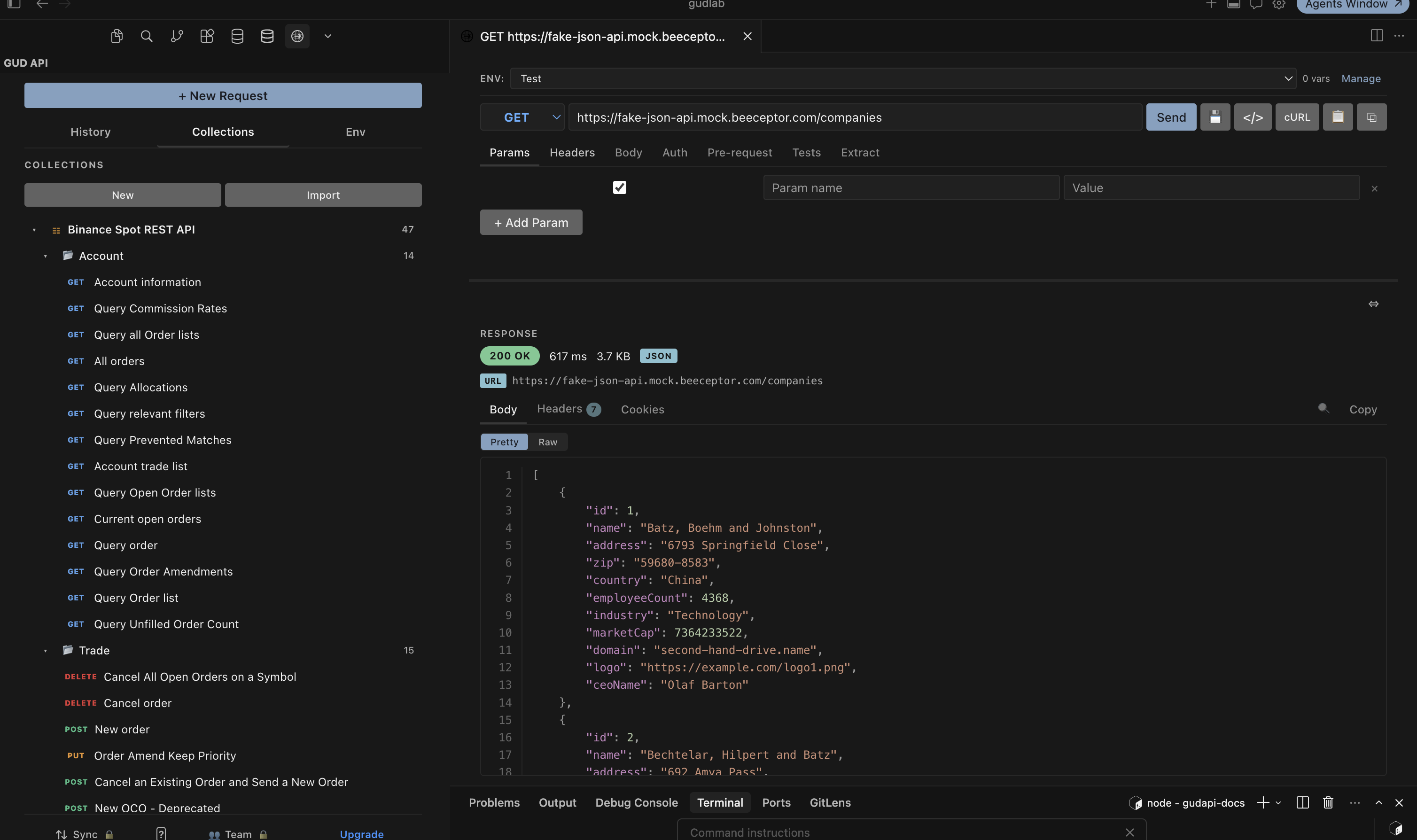
All HTTP methods, query params with URL sync, headers, and body types: JSON, form, multipart with file uploads, and plain text.
GraphQL
Dedicated query and variables editor. Auto-sets POST and the JSON content type. Saved GraphQL requests reload into the two-pane editor.
Code generation
Generate cURL, JavaScript fetch, Python requests, or Node.js axios from any request with one click. Copy to clipboard instantly.
Collections & import
Organize requests into collections and nested folders. Import from Postman v2.x, Thunder Client, and OpenAPI 3.x / Swagger 2.0.
History & cookies
Every request is auto-saved. Browse your last 100 with method, URL, status, and timing. Cookies auto-captured and re-sent per domain.
AI agents (MCP)
An MCP server lets Claude Code, Cursor, and other agents build, run, and save API requests as real collections in your project.
Your AI agent tests APIs. Now it can save that work.
Coding agents test endpoints with throwaway curl commands that vanish when the session ends, so you rebuild every request by hand. Gud API ships an MCP server that turns that testing into something you keep.
The agent builds an endpoint, runs it, and saves the request and the response as a real collection in your project's .gud-api/ folder. It appears in your sidebar while the agent works, keeps the responses it captured, and commits to git so it reviews in the pull request next to the code.
// .mcp.json: drop this in your project and your agent can build collections
{
  "mcpServers": {
    "gud-api": {
      "command": "npx",
      "args": ["-y", "@gudlab/gud-api-mcp", "--project", "."]
    }
  }
}Your editor, any MCP client
Install the extension in Cursor, Windsurf, VSCodium, Antigravity, Trae, and other VS Code-compatible editors from Open VSX, or in VS Code from the Marketplace. The MCP server works with any MCP client: Claude Code, Cursor, Windsurf, Codex, Cline, Zed, and more.
Free where others charge
Other API clients keep shrinking their free tier: collection caps, forced accounts, features moving behind a subscription. Gud API goes the other way. The free tier isn't a teaser, it's the full product. Unlimited requests, unlimited collections, no account. Pro is optional, and only adds cloud sync and unlimited environments for people who want them.
Coming from another client? See vs Thunder Client, vs Postman, vs Bruno, or the full comparison matrix. Gud API imports from all of them, and you can paste a cURL command from anywhere to build a request in seconds.
Simple, honest pricing
The free tier isn't a teaser, it's the full product. Pro adds cloud sync. Team adds shared collections.
- Unlimited requests & collections
- REST & GraphQL
- Code generation & cURL import
- Request history & cookies
- 1 environment
- Everything in Free
- Unlimited environments
- Cloud sync across devices
- Global variables
- Priority support
- Everything in Pro
- Shared collections & environments
- Team management & invite codes
- Centralized billing & VAT invoicing
- Role-based access control
The MCP server is free for everyone.
Support Gud API
The core product is free with no limits and no account. If it saves you time, you can support development directly.
Start building APIs in your editor today
Free, lightweight, and built for developers who live in their editor. Install Gud API and stop switching windows.